Upload once. ChopHub finds your best moments, cuts them into vertical clips, adds captions, writes the titles on paid plans, and posts them to TikTok, Reels, Shorts, X, Facebook, and LinkedIn on a schedule (3 platforms on Free, all 6 on paid plans) — so you never open an editor.
1 → 25Ready-to-post clips from a long video, by default
6Platforms, auto-distributed
7 daysOf content from 1 upload
30Caption languages
FreeTo get started
▸ How it works
Three steps. None of them yours.
You hand over one video. ChopHub hands back a week of captioned shorts, already posted. There is no step where you open an editor.
STEP 01 / UPLOAD
2.4 GBstreaming
01Drop in your video
Upload a file or paste a YouTube link — a podcast episode, a webinar, a livestream, a coaching call. That is the last thing you have to do.
8file formats
YouTubepaste a link
4Kmax quality
STEP 02 / CLIPPING
02ChopHub finds the good parts
It listens to what you said, watches where the energy is, and picks the moments most likely to hook a scroller — then crops them to vertical, keeps the speaker centred, burns in captions, and (on paid plans) writes the titles.
Word-levelcaption timing
30caption languages
25clips by default on long videos
STEP 03 / POSTING
03It posts them for you
Your clips go out to TikTok, Reels, Shorts, X, Facebook, and LinkedIn — spread across the week, at the hours your own audience actually shows up, each one sized and captioned for that platform. You do not press publish.
6platforms
7 daysqueued ahead
0times you post
▸ The actual app
Not a mockup. This is the app.
Real screens from a real account, with real numbers. Follow one upload from the instruction you type to the analytics that come back.
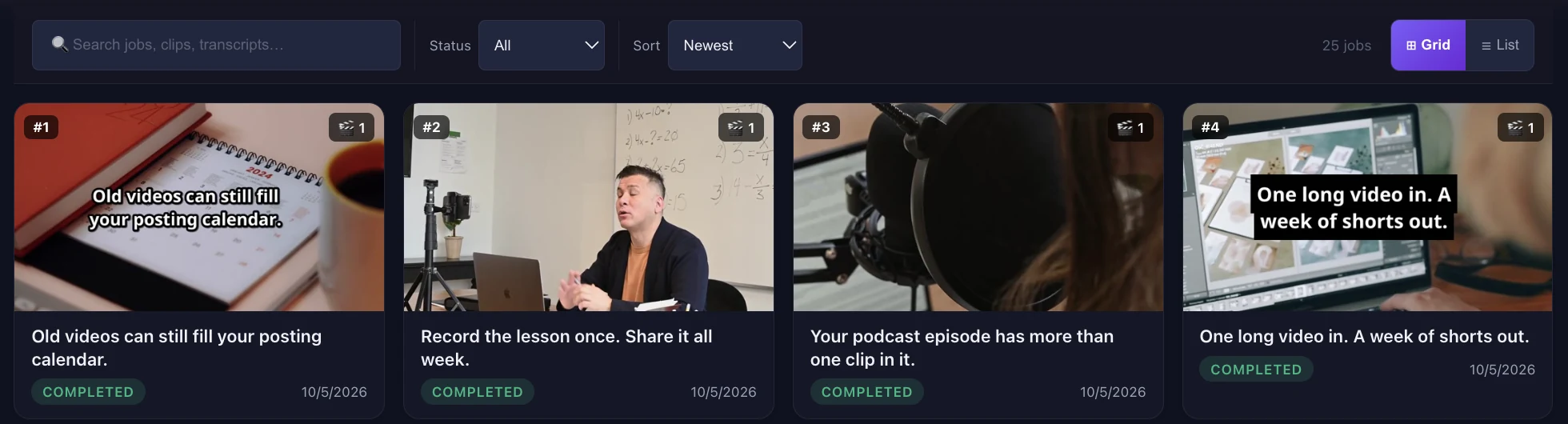
Every upload becomes a finished jobEach job comes back with a cover, a clip count and how many of its clips scored hot — so you can see at a glance which uploads delivered.
Step 1 · Find it
Tell it what to find
Leave it on autopilot, or say what you're after in plain English before the clipping starts.
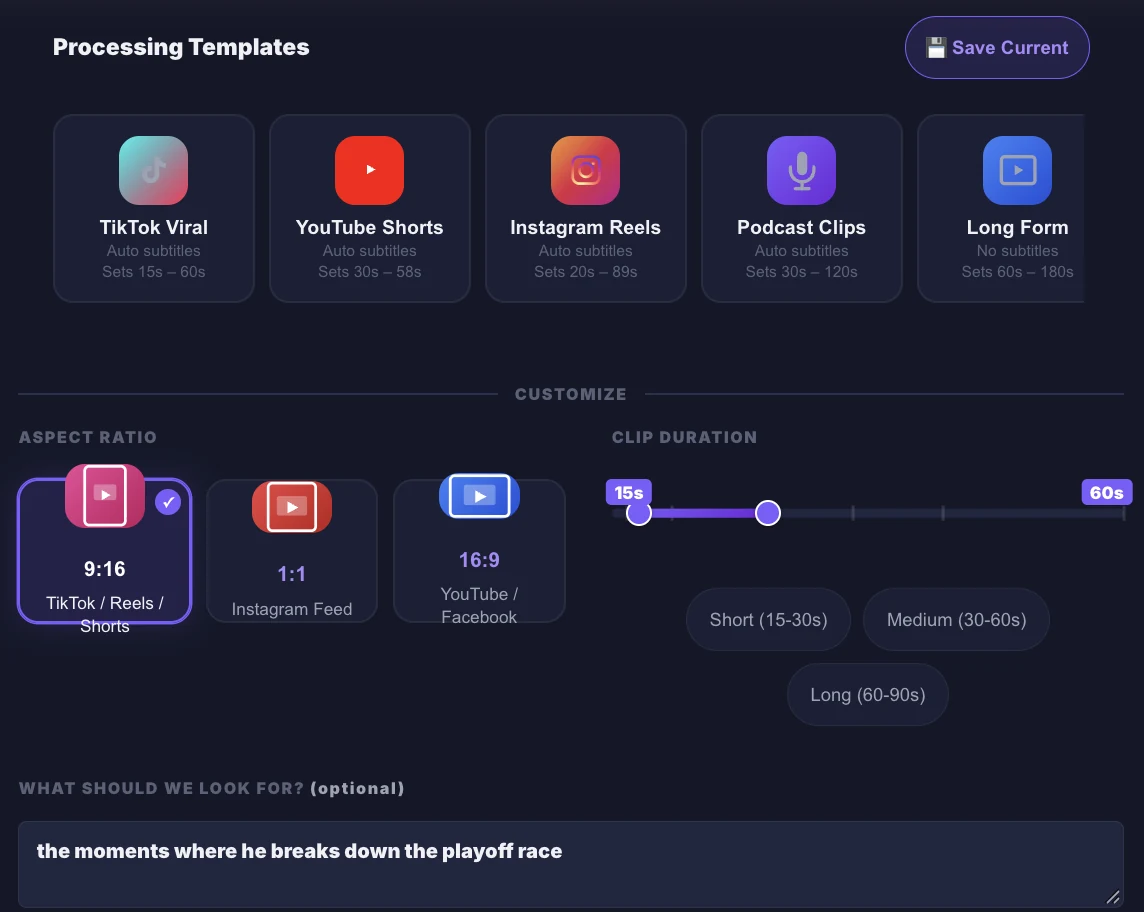
An optional prompt. Type “the moments where he breaks down the playoff race” and matching moments are favoured. Leave it blank for the best moments overall — and if nothing matches, ChopHub falls back to them and tells you.
One-click presets for TikTok, YouTube Shorts, Instagram Reels, podcast clips and long form set clip length and subtitles for you.
Your shape, your length. Pick 9:16, 1:1 or 16:9 and drag the clip-duration range.
app.chophub.io / chop
Step 2 · Rank it
Every clip ranked before you post
You don't get a pile of clips in upload order. You get a ranked list, with the strongest moments on top.
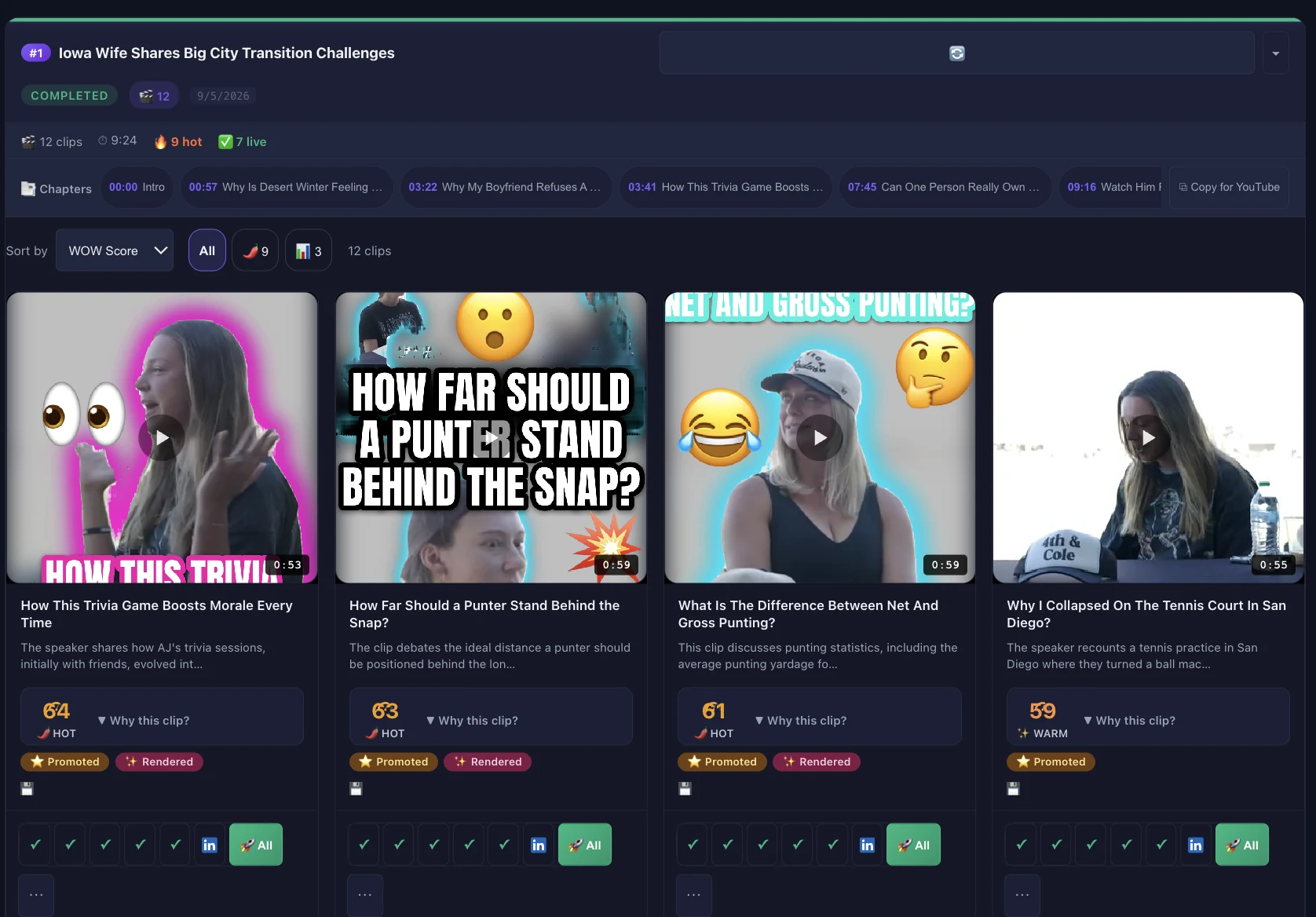
A WOW score from 0 to 100 and a tier on every clip, so you can sort the batch and filter to the hot ones.
Chapters with timestamps for the whole episode, ready to paste into your YouTube description with one click.
One-click publishing to any connected platform — YouTube Shorts, TikTok, Instagram Reels, Facebook, X and LinkedIn — or to all of them at once (the Free plan publishes to YouTube Shorts, TikTok and Instagram).
Jobs make up to 25 clips by default — fewer for short videos — within your plan's limit. The job shown came from a 9-minute video.
app.chophub.io / results / job
What happens after you hit upload.
Seven things get done. You do the first one.
📤
01 Upload Video
Drop in a file or paste a YouTube link. That's your whole job.
🧠
02 Your best moments, found
ChopHub picks the moments most likely to hook a scroller. You don't scrub the timeline.
💬
03 Captions + Titles Generated
Word-timed captions in 30 languages, plus AI-generated titles (Creator and above) and thumbnails (Pro and above).
📐
04 Cropped to fit each platform
Every clip re-framed to 9:16, 1:1, or 16:9 — with the speaker kept in shot, not chopped in half.
📅
05 Spread across your week
Clips are queued for the hours your own audience actually turns up, seven days ahead.
🚀
06 Posted without you
They go live on TikTok, Reels, Shorts, X, Facebook, and LinkedIn. You never press publish.
📊
07 You see what worked
Views and engagement come back into one dashboard, and the posting times adjust to match.
▸ What you get
Six jobs you'll never do again.
Choosing the moments, cropping, captioning, writing titles, picking thumbnails, and remembering to post. All six happen without you.
01 / SelectionRanked by WOW score
One video in. Up to twenty-five clips out.
ChopHub reads the transcript and looks for the moments that actually stand on their own — a strong opening line, a complete thought, a point worth arguing with. It keeps those and throws the rest away. You don't scrub a timeline looking for them.
25
Clips by default, on long videos
35
Maximum per video
9:16
Cropped for you
Every clip comes back captioned, cropped, and titled — ready to post as-is
02 / ViralityPre-publish score
78/100
Virality score
Know which clips to post first.
Every clip gets a 0–100 WOW score and a tier, so the batch arrives ranked. Lead with your strongest moments; skip the rest.
03 / Captionsword-level timing
word-perfect, frame-accurate
Word-timed captions in 30 languages.
04 / Distribution6 platforms
Auto-distribute content across 6 platforms.
05 / MetadataScored & ranked
92
87
81
Titles & thumbnails generated, scored, ranked.
Candidate thumbnail frames are scored for sharpness, contrast and faces, then ranked best-first. Up to three title options per clip to choose from.
06 / SchedulingPeak-hour heatmap
Posts hit when your audience is actually online.
ChopHub finds each platform's best posting windows in your own post history and schedules clips into them. Until you have enough history, it uses platform defaults — and labels them as defaults.
▸ Studio editor
Automatic by default. Editable down to the word.
Open any clip in Studio, ChopHub's built-in editor, to fix anything the AI got wrong, or take it somewhere new — without exporting to another app first.
Step 3 · Polish it
Captions styled in one click
Every clip arrives captioned. When you want a different look, it's a swatch away.
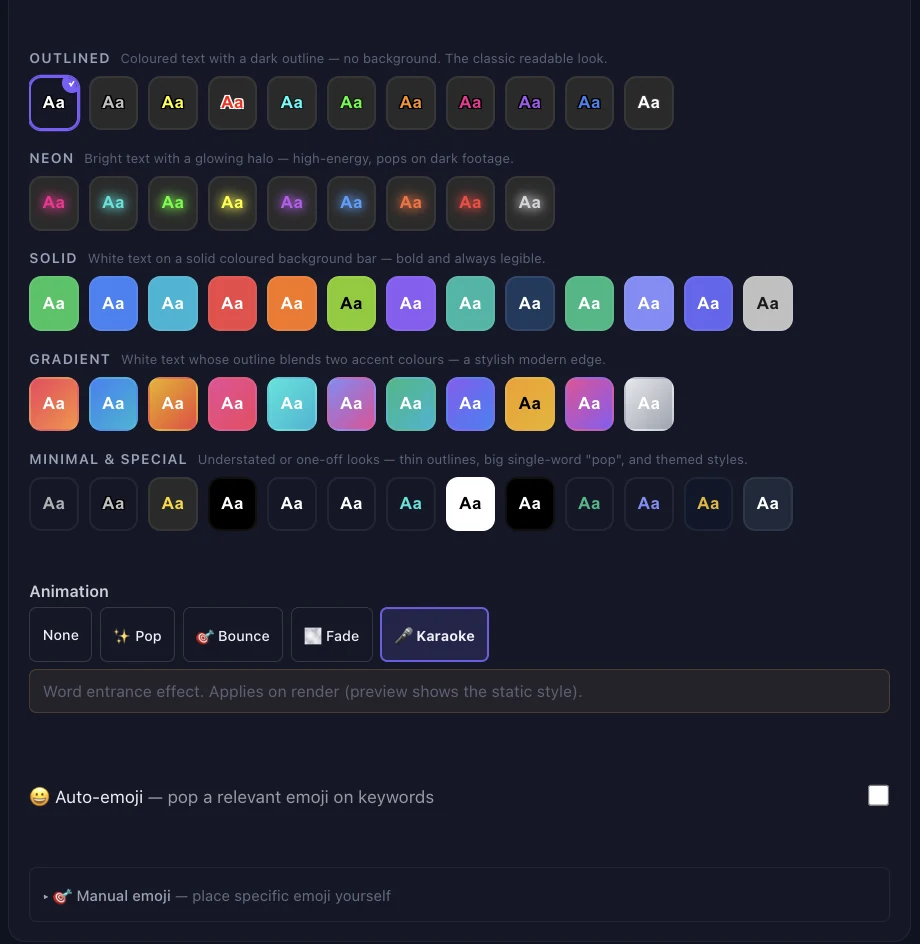
50+ caption styles across five families — Outlined, Neon, Solid, Gradient, and Minimal & Special.
Word-by-word animation — Karaoke, Pop, Bounce or Fade — baked into the rendered clip.
Emoji your way: let ChopHub add them automatically, or place your own, then Apply & Render.
studio / captions
Step 3 · Polish it
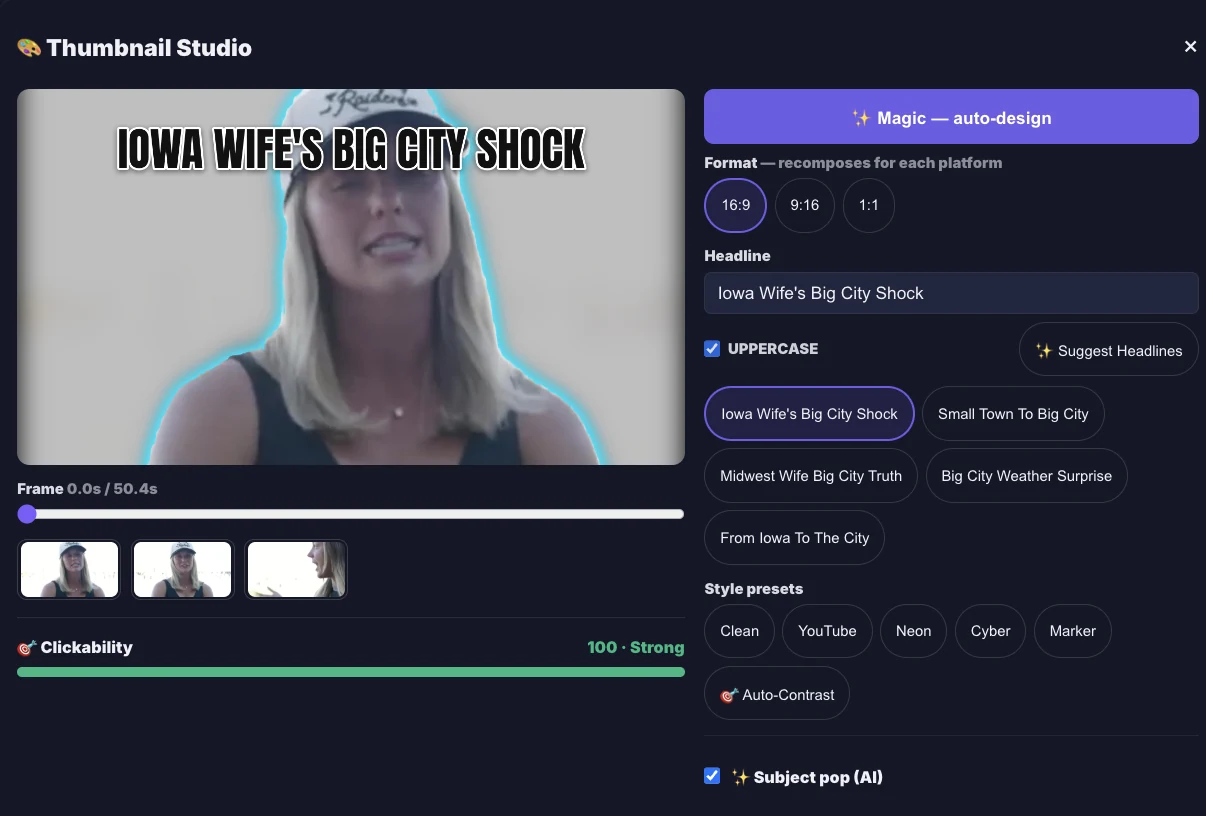
Thumbnails that earn the click
Thumbnail Studio turns a frame of your clip into a cover worth tapping.
Pick the frame, then hit Magic to auto-design it — or choose from AI-suggested headlines and style presets.
Subject pop lifts the speaker off the background, and a Clickability meter rates the design as you work.
One design, three shapes: it recomposes for 16:9, 9:16 and 1:1.
AI thumbnails are included on Pro and above.
studio / thumbnail
And everything else in Studio
✂️
Edit the transcript, and the video follows
Soumtherealreasonyou knowlikeitworkedwas…
Delete a word, a sentence or a tangent from the clip's transcript and it's cut from the video. Filler words and long silences can be removed in one pass, so the clip tightens without you scrubbing a timeline.
💬
50+ caption styles
Word-timed captions in more than fifty styles, with automatic emoji. Placement steers around faces, so captions don't sit across the speaker's mouth.
🎯
Reframe to any shape
9:161:116:9
Active-speaker reframing follows whoever is talking — wide to vertical, or vertical back to wide. Output in 9:16, 1:1 or 16:9.
🎞️
Stock B-roll
Drop in stock footage from Pexels and Pixabay to cover a cut or illustrate a point.
🎵
Music that ducks under your voice
Pick a track from the music library. It dips automatically whenever someone speaks and comes back up in the pauses.
🌍
Dub into another language
Translate a clip's transcript and re-voice it with a text-to-speech voice. It's a generated voice, not a clone of yours. Pro and above.
🏷️
Your brand kit
Keep your logos in a library, place them in any corner, add a watermark or progress bar, and save the combination as a preset you apply in one click. Pro and above.
🪝
Hooks and title variants
Generate alternative opening hooks for a clip, and several title options to choose between before it posts.
📤
Finish in the editor you already use
Need a multi-track timeline or transitions? Export the cut list as an EDL, FCP 7 XML or CSV markers to open in Premiere Pro or DaVinci Resolve, or download a CapCut bundle with the clip and its captions. Pro and above.
Studio is included on every paid plan, from Creator up; dubbing, brand kits and export to other editors are Pro and above. Clips still arrive captioned, cropped and titled — Studio is there when you want to change something, not a step you have to take.
▸ Step 4 · Schedule it
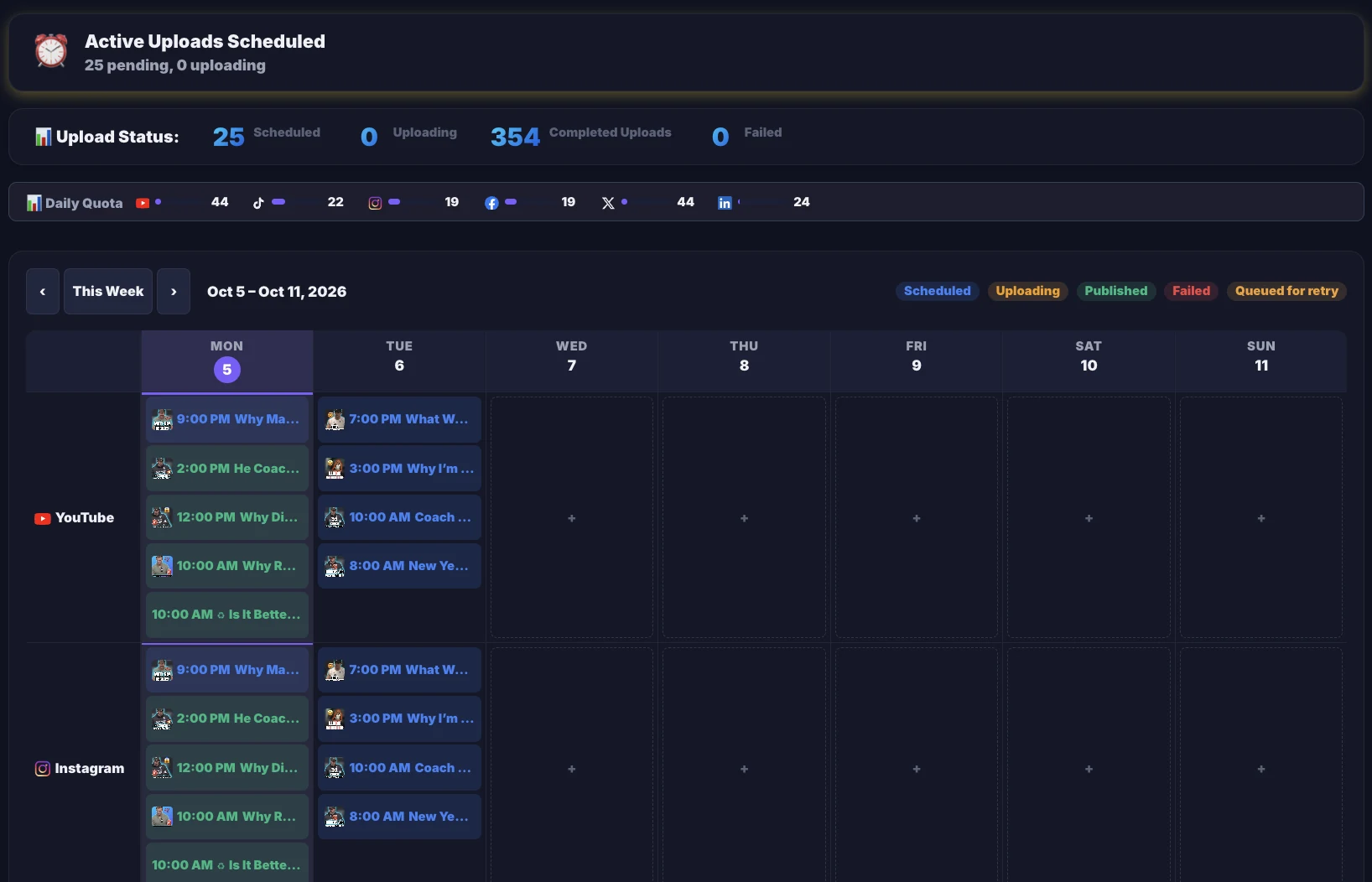
Your week, scheduled.
Every queued post on one calendar — a row per platform, a card per post, and a status on each one. Look at it whenever you like. It posts either way.
app.chophub.io / scheduler
Every post, on one calendarEach post carries its status — scheduled, uploading, published, failed or queued for retry — and the quota bar shows how much room every platform has left today.
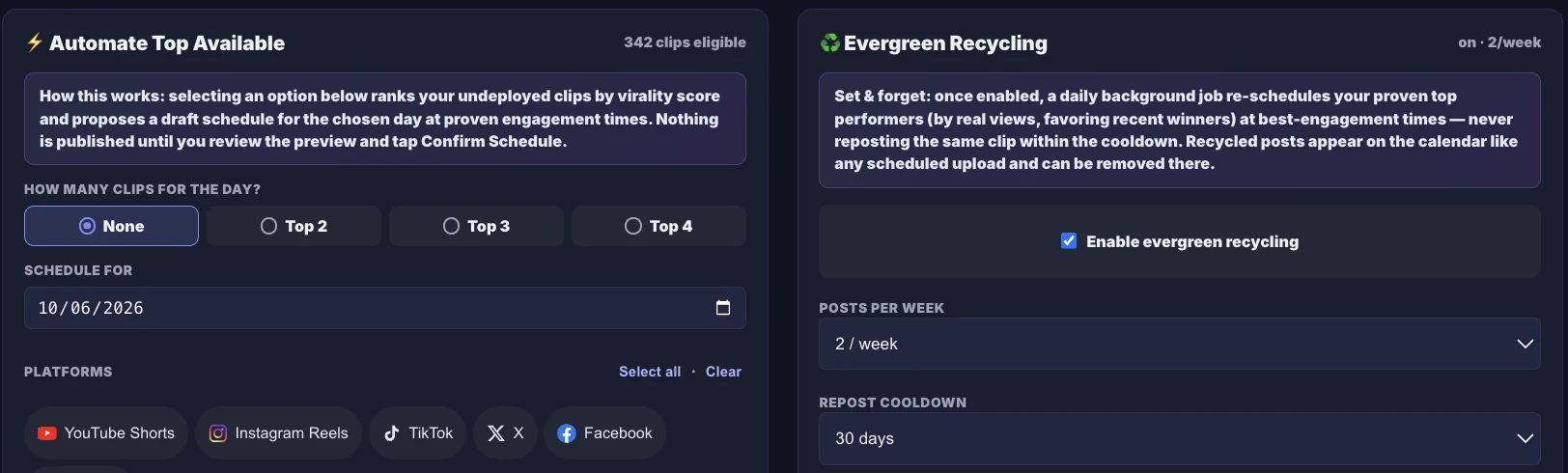
Fill the week without filling it in
app.chophub.io / scheduler / automation
⚡ Automate Top
Ranks the clips you haven't posted yet by virality score and drafts a schedule at your proven engagement times. Nothing publishes until you review the draft and confirm it.
♻️ Evergreen Recycling
Opt in, and a daily job re-schedules your proven top performers — ranked by real views — at your best times, never reposting a clip inside its cooldown (30 days by default).
Posting windows come from your own post history. Until there's enough of it, ChopHub uses platform defaults and labels them as defaults.
▸ Step 5 · Learn from it
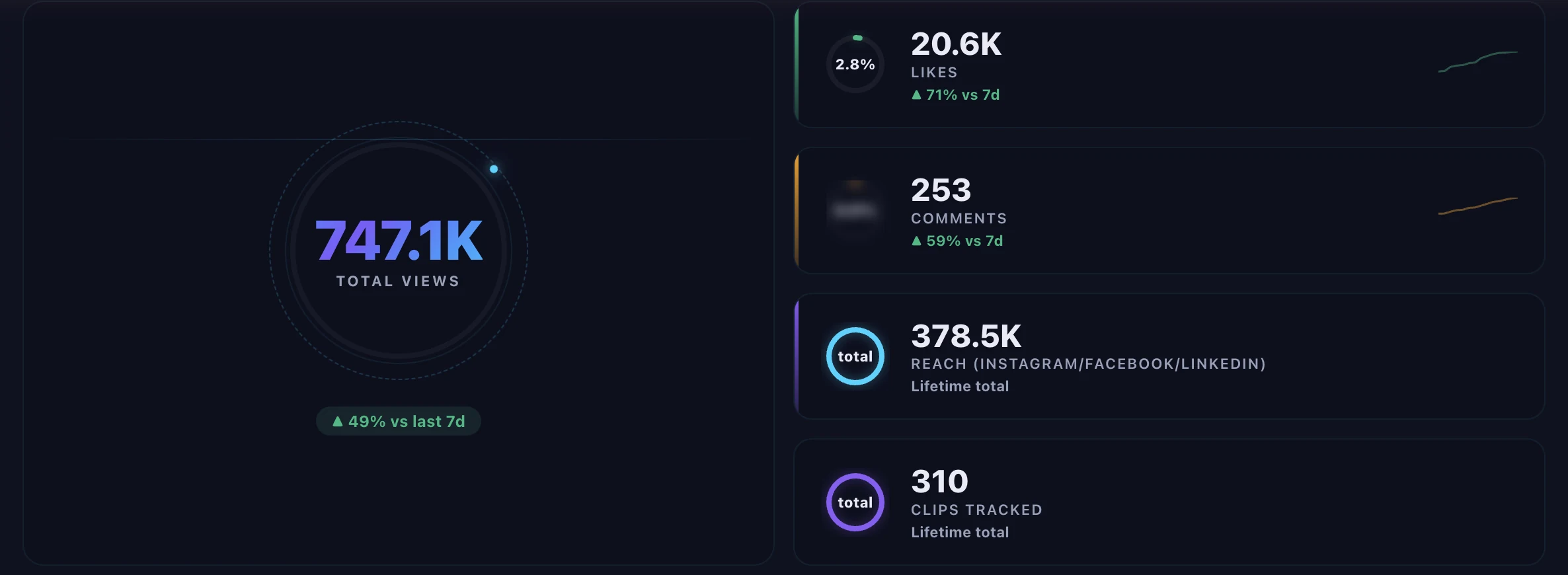
Analytics that tell you what worked.
Views, likes and comments pulled back from every platform and every connected account after publishing — then turned into what to do next.
app.chophub.io / analytics
The headline numbers, with the trendTotal views, likes and comments, each compared with the previous seven days — plus your reach and every clip being tracked.
app.chophub.io / analytics / platforms
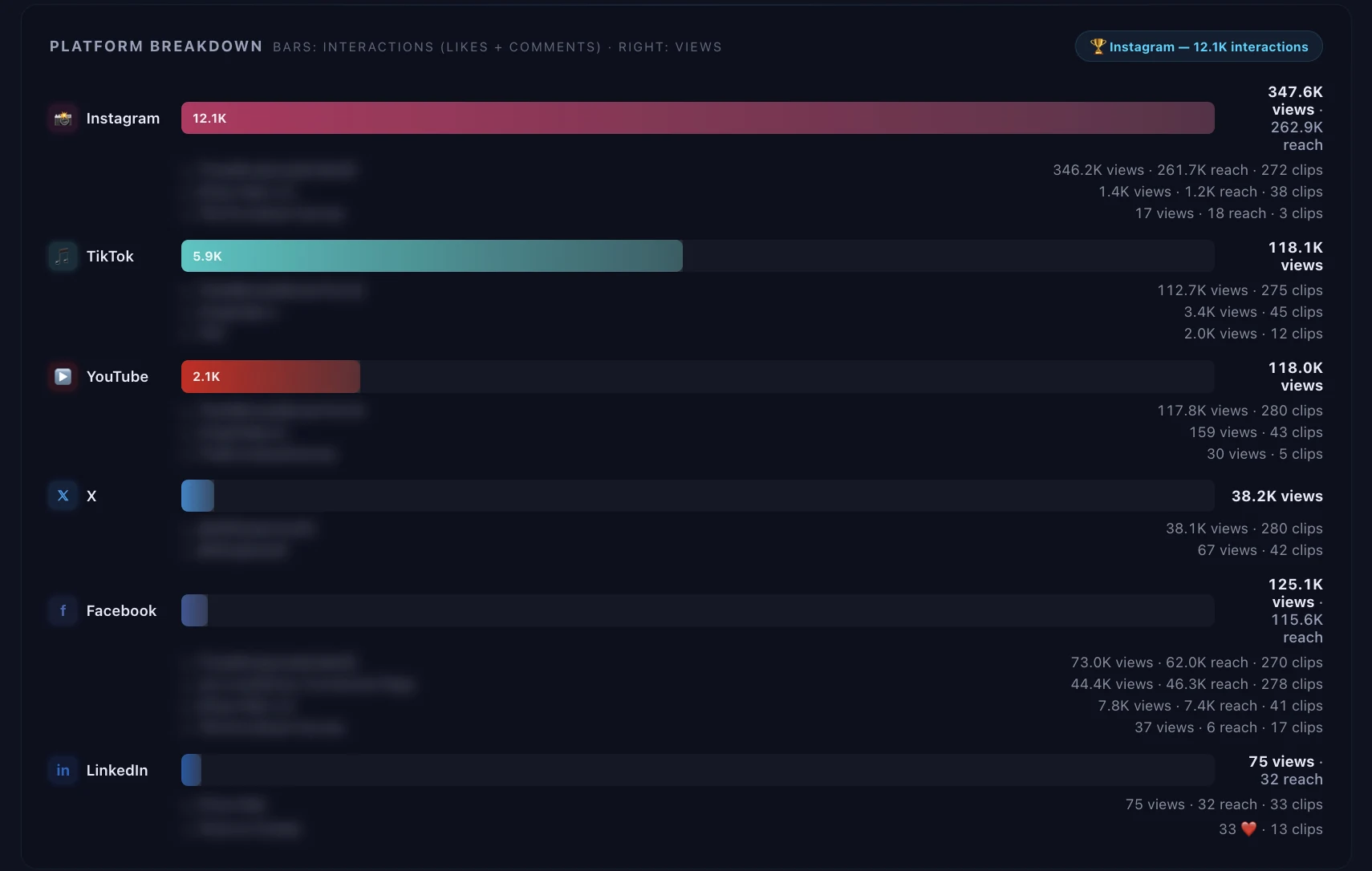
Every platform, every accountInteractions and views per platform, split out by each connected account — run three Instagram accounts and you see three rows, not one blended number.
app.chophub.io / analytics / best times
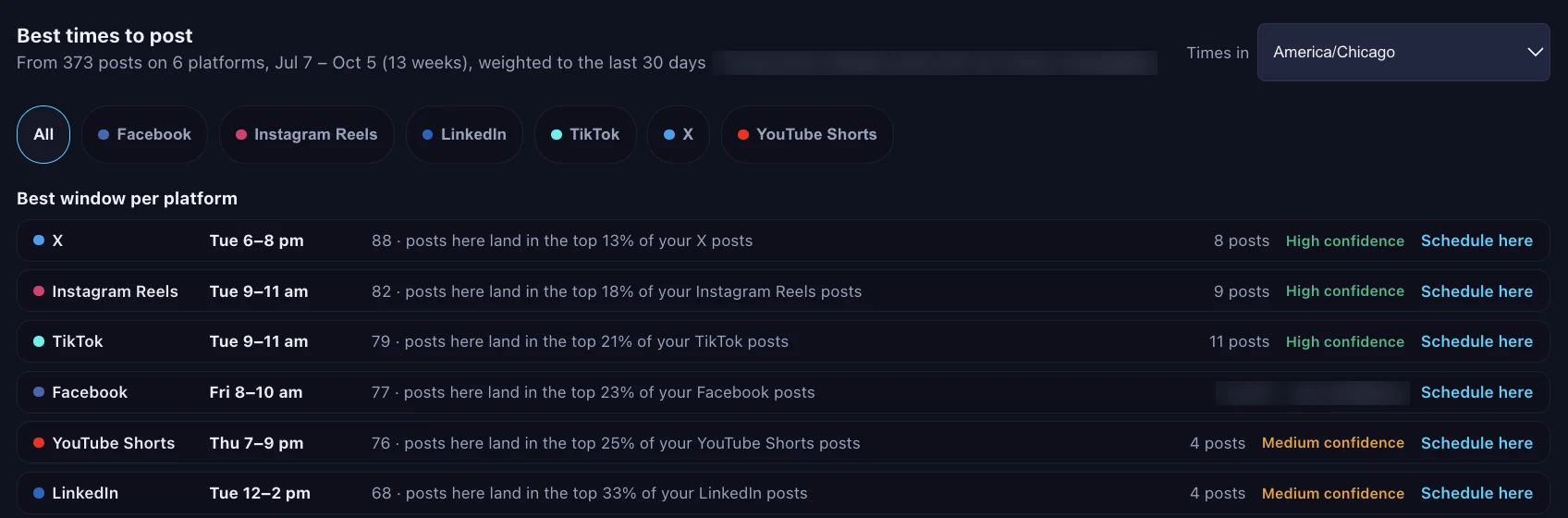
Best times, from your own postsThe strongest posting window for each platform, worked out from your own post history in your timezone, with a confidence label and a “Schedule here” shortcut.
app.chophub.io / analytics / insights
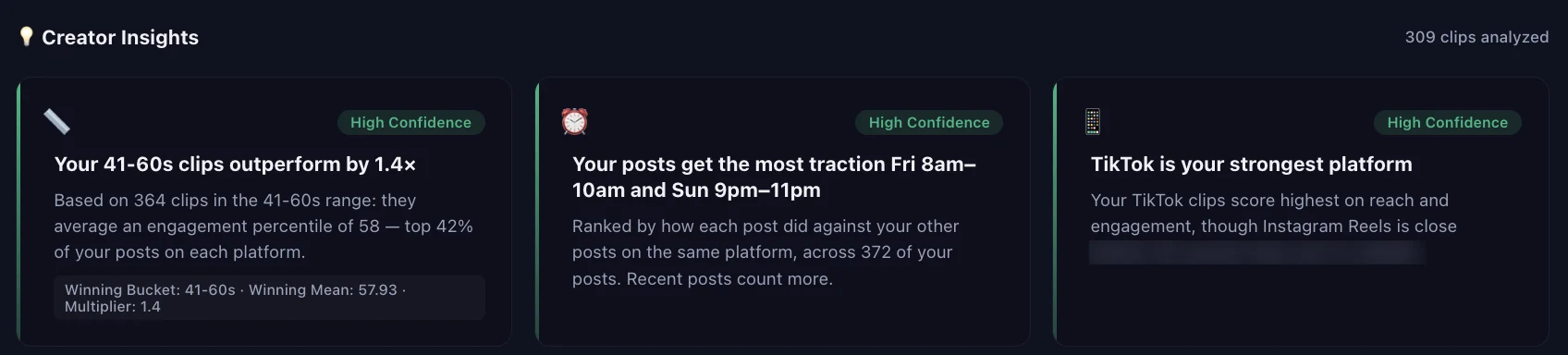
What's working, in plain EnglishClip length, posting days, your strongest platform, hook length — each insight comes with a confidence level, so you know how much to trust it.
Full analytics is included on Pro and above.
Step 5 · Learn from it
Patterns from your own data
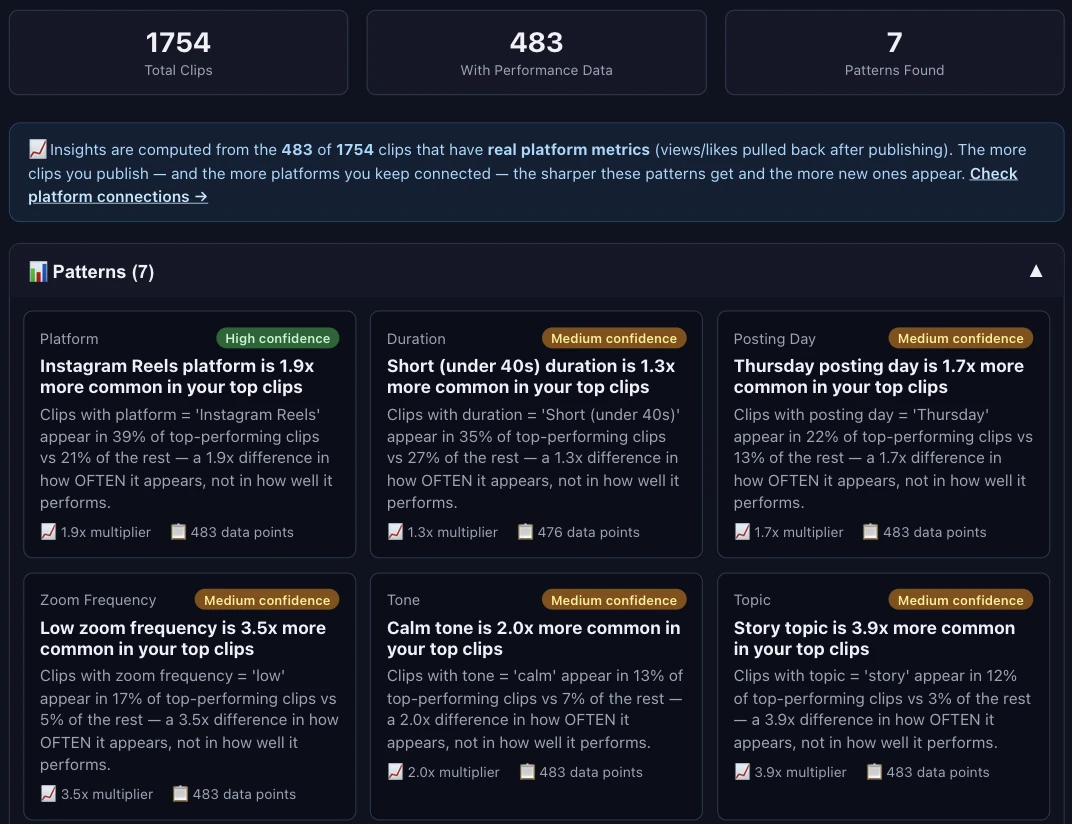
ChopHub compares your top-performing clips with the rest and tells you what they have in common.
Platform, length, posting day, tone, hook style and caption density — each checked against your own results, not someone else's benchmark.
Straight about the maths: a pattern says how much more often a trait shows up in your top clips — story topics 3.9x, calm tone 2.0x — not a promised lift.
Built only from clips with real platform metrics, with the data points and a confidence label on every card.
app.chophub.io / insights
Most clippers stop at the download button.
They hand you a folder of clips and leave the posting to you. That's the part that actually eats your week — so that's the part ChopHub does.
14-day free trial (150 minutes of processing) on your first upgrade from Free to a paid plan.
Unused credits roll over for one month on paid plans. Annual plans receive their credits monthly.
Need more? Paid plans can add credit packs — Boost $9 / 60 credits, Standard $25 / 200, Bulk $60 / 600. Pack credits expire 12 months after your most recent pack purchase.
Clips are kept for 30 days on every plan — download or publish them before they expire.
Slow mode (paid plans). When monthly and pack credits run out, slow mode lets you keep chopping up to 60 minutes of source video a month at 0 credits, one job at a time, until your month resets. The Free plan has no slow mode: its 30 credits are a one-time starter grant. Re-chopping an existing video with new settings needs available credits.
Cutting, captioning, cropping and posting 32 clips by hand is most of a working day, every time you publish.
Pro is $29 a month — and you don't do any of it.
Built For
Who uses ChopHub
ChopHub is built for people who already make long videos and don't have time to cut them up. If you make short-form natively, you don't need this.
01 / CREATORSSOLO → SCALED
Podcasters & Creators
Record once, publish all week. Drop in the full episode and the moments worth hearing come back as standalone shorts — captioned, cropped, and already posted.
1→25clips from a long upload
9:16auto-framed
0manual edits
Episode→Hooks→Shorts
"A 2-hour episode comes back as up to 25 shorts, queued to post."
02 / MARKETINGTEAM SCALE
Marketing Teams
Turn campaigns into continuous content streams. Stop bottlenecking on video editing — turn webinars, product demos, and interviews into a week of platform-native content with a single upload.
6channels at once
3shapes: 9:16, 1:1, 16:9
1upload to do it
Webinar→Cuts→Channels
"One 60-minute webinar fills the whole week's calendar."
03 / EDUCATORSKNOWLEDGE OPS
Coaches & Educators
Convert long-form content into structured learning clips. Repurpose training sessions and tutorials into bite-sized lessons that reach learners on every platform — automatically captioned, framed, and scheduled.
100%auto-captioned
∞reusable lessons
5minsetup
Lecture→Lessons→Library
"One workshop becomes 20 lessons that keep working."
Minutestypical processing time
Word-levelcaption timing
30caption languages
6platforms, posted for you
FAQ
Common questions
Everything you need to know about ChopHub.
It really posts. Once you've connected a platform and turned on scheduling, ChopHub uploads the clip to that platform at the scheduled time with no action from you — including overnight and at weekends. If you'd rather approve each clip first, you can leave scheduling off and publish from the dashboard with one click instead. Both modes are supported; automatic is the default.
This is the failure everyone worries about, so we don't leave it to chance. ChopHub refreshes your platform connections automatically in the background, and checks every hour for any that are heading toward expiry. You get an email roughly two days before a connection lapses, naming the account and linking straight to the reconnect button — so the normal case is that you fix it before anything is missed. If a post does fail, you're emailed about that too. Nothing fails silently.
ChopHub accepts MP4, MOV, AVI, MKV, WebM, M4V, FLV, and WMV formats. You can also paste any public YouTube URL. Maximum video length depends on your plan — Free supports up to 30 minutes, Creator up to 60 minutes, Pro up to 2 hours, Team up to 3 hours, and Content Engine has no limit.
ChopHub's AI analyzes your video for engagement signals — speaker energy, pacing, keyword density, emotional peaks, and narrative structure. It identifies moments most likely to perform well as standalone short-form clips.
Yes. After processing you can edit titles, descriptions, captions, and hashtags for each clip. On paid plans, the Studio editor also lets you cut the clip by deleting words from its transcript, remove filler words and silences, restyle captions, reframe to 9:16, 1:1 or 16:9, and add B-roll and music. On Pro and above you can also apply your brand kit.
ChopHub uses OAuth to securely connect to each platform. Click "Connect" in your dashboard, authorize with your account, and you're set. Tokens are encrypted and never exposed to third parties.
Yes — the Free plan gives you 30 free credits to start (30 minutes of video, one-time — they don't refill) and up to 2 videos a month, up to 5 clips per video, and auto-posting to YouTube Shorts, TikTok and Instagram. Clips made on Free carry a ChopHub watermark; paid plans remove it. No credit card required.
1 credit = 1 minute of video you upload, however many clips come out of it — a 45-minute episode costs 45 credits. On paid plans, unused monthly credits roll over for one month, and annual plans receive their credits monthly. Paid plans can also buy credit packs — Boost ($9 for 60 credits), Standard ($25 for 200) or Bulk ($60 for 600) — which expire 12 months after your most recent pack purchase.
On a paid plan, when your monthly and pack credits are used up, slow mode lets you keep chopping up to 60 minutes of source video a month at 0 credits, one job at a time, until your month resets. The Free plan has no slow mode: its 30 credits are a one-time starter grant. Re-chopping an existing video with new settings needs available credits.
Yes. Your first upgrade from Free to a paid plan starts with a 14-day free trial that includes 150 minutes of processing; your plan's full monthly allowance starts with your first paid month. Cancel before the trial ends and you won't be charged. Paid plans are billed monthly, or yearly for up to 35% less.
Processed clips are stored securely on AWS for 30 days on every plan. Original uploads are automatically deleted within 7 days, and videos fetched from a YouTube link within 14 days. If you create an editor project from an upload, its source is kept until you delete that project. You can download any clip before it expires. We never use your content for training.
The Team plan ($99/mo, or $79/mo billed yearly) includes 3 seats, 5 concurrent jobs and 1,800 credits a month. The Content Engine plan ($249/mo, or $209/mo billed yearly) offers 6 seats, 10 concurrent jobs, up to 35 clips per job, and 5,000 credits a month. For enterprise needs, contact support@chophub.io.
📬
Not ready to start yet?
Get weekly tips on content automation, platform algorithm updates, and creator growth strategies. No spam — unsubscribe anytime.