The good moments are buried in hours of stream
A long stream has a few minutes that would make great shorts, spread across hours of waiting screens, breaks and slow stretches. Finding them means rewatching the VOD, and by the time you've cut, captioned and posted them, the next stream has already started. Most streamers end up clipping a couple of highlights, or none.
ChopHub reads through the whole VOD for you, cuts the moments that stand on their own, and posts them across the week to the platforms you connect. There is more on the ChopHub homepage.
How it works for a stream VOD
- Get the VOD in. If your stream replay is published as a public YouTube video, paste its link. For Twitch and other platforms, download the VOD as a video file and upload it (MP4, MOV, AVI, MKV, WebM, M4V, FLV or WMV). ChopHub doesn't import directly from Twitch.
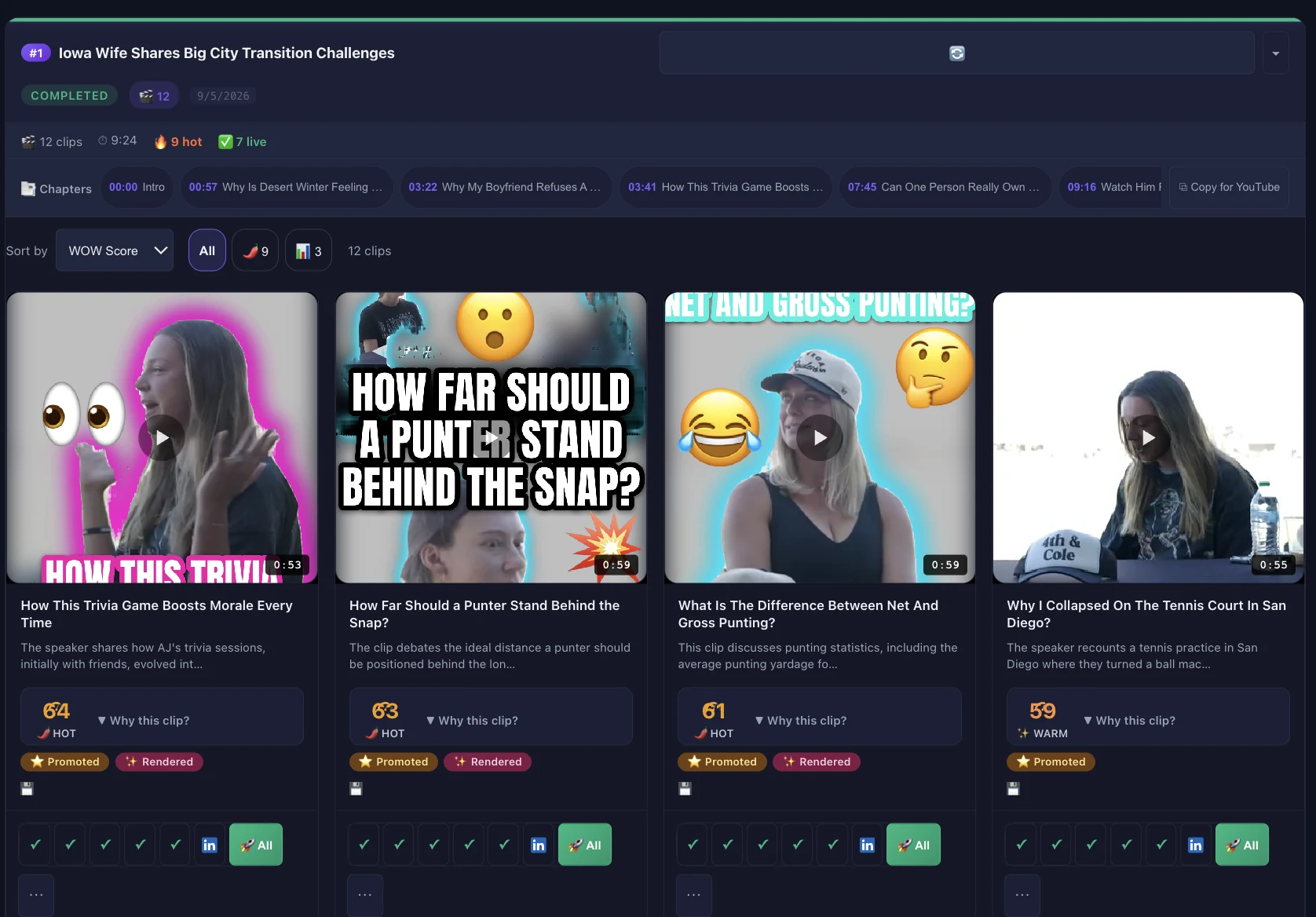
- ChopHub finds the moments. It transcribes the stream and picks passages that make sense without the rest: a strong reaction, a complete story, a hot take. Clips come back ranked, strongest first. You can set a clip length and a target number of clips.
- Crop, captions and titles. Each clip is cropped to vertical with the speaker in frame and captioned with word-level timing. On paid plans, AI titles are written for each clip.
- Posted while you're offline. Connect YouTube, TikTok, Instagram, Facebook, X and LinkedIn. The scheduler spreads clips across the week at times ranked from your own results, and keeps posting overnight and at weekends.
Before you upload a long stream
Check the length limit
The longest source you can upload is 30 minutes on Free, 60 minutes on Creator, 2 hours on Pro, 3 hours on Team, and unlimited on Content Engine. For a stream longer than your plan allows, trim it or upload it in parts that fit.
Trim the dead time
Billing is 1 credit per minute of video you upload, however many clips come out of it. A 3-hour VOD uses 180 credits. Cutting the waiting screen, breaks and end screen before you upload saves credits and gives ChopHub only the parts worth reading.
Talking helps
ChopHub chooses moments from the transcript, so streams where you talk through what's happening give it the most to work with: commentary, just-chatting, live podcasts, Q&A and co-streams. Silent or music-only sections won't get captions, and a purely visual play with no commentary is harder for it to spot.
Keep the best clips coming back
Turn on evergreen recycling and your best performers, ranked by real views, are re-queued into open slots, so the calendar keeps filling between streams.
Who this is for, and who it isn't
A good fit if you…
- Stream regularly and talk a lot while you do
- Want shorts going out on days you don't stream
- Run accounts on several platforms, or more than one account on the same platform
Probably not a fit if you…
- Want highlight reels of gameplay with no commentary
- Need 4K output. Clips render up to 1080p
- Need clips pulled straight from Twitch without downloading the VOD first
Questions people ask
Can ChopHub pull VODs straight from Twitch?
No. ChopHub takes file uploads and public YouTube links. For a Twitch VOD, download it as a video file and upload it. If your stream replay is published as a public YouTube video, you can paste its link instead.
My streams are three or four hours long. Will that work?
Maximum source length depends on your plan: 30 minutes on Free, 60 minutes on Creator, 2 hours on Pro, 3 hours on Team, and no limit on Content Engine. On other plans, trim the VOD or upload it in parts that fit the limit.
How many credits does a long stream use?
1 credit per minute of video you upload, however many clips come out of it. A 3-hour VOD uses 180 credits. Trimming breaks and waiting screens before you upload saves credits.
Will it find the best gameplay moments?
ChopHub chooses moments from the transcript, so it works best on streams where you talk through what is happening. You can add an optional written prompt describing the moments you want; if nothing matches, it falls back to the best moments. Silent or music-only sections will not get captions.
Which platforms can the clips post to?
YouTube Shorts, TikTok, Instagram, Facebook, X and LinkedIn on paid plans, with multiple accounts per platform. The Free plan posts to YouTube Shorts, TikTok and Instagram.
What resolution are the clips?
Clips are rendered up to 1080p and delivered as MP4 (H.264) files.
Keep reading
Try it on your last stream
Free plan, no card. Upload one VOD and see what comes back.
Clip My First Stream Free →