Why podcast clips rarely get made
The full episode is where your best material lives, but plenty of people meet a show through a short moment in their feed first. Making those moments by hand means scrubbing back through an hour of conversation, cropping a wide shot down to vertical without cutting anyone in half, typing captions, writing a title for each clip, and then uploading the same file to several apps. When the week gets busy, that is the job that slips.
ChopHub takes that whole job: choosing the moments, cutting, cropping, captioning, titling and posting. It was built by a creator who had this exact problem with his own long-form show, which is why it doesn't stop at a folder of downloads. The clips end up scheduled and published. See the ChopHub homepage for the full product tour.
How it works for a podcast episode
- Upload the episode. Drag in the video file (MP4, MOV, AVI, MKV, WebM, M4V, FLV or WMV) or paste the public YouTube link if the episode is already on your channel.
- ChopHub finds the moments. It transcribes the conversation and looks for passages that work without the rest of the episode: a strong opening line, a complete thought, a point worth arguing with. Clips come back ranked, so the strongest are listed first.
- Captions, crop and titles. Each clip is cropped to vertical with the speaker kept in frame, and captions are burned in with word-level timing. On paid plans, AI titles are written for each clip, and you can edit any title, caption or hashtag before it goes out.
- Schedule or publish. Connect YouTube, TikTok, Instagram, Facebook, X and LinkedIn. Turn on scheduling and clips go out across the week at times ranked from your own past results, or leave it off and publish each one yourself with one click.
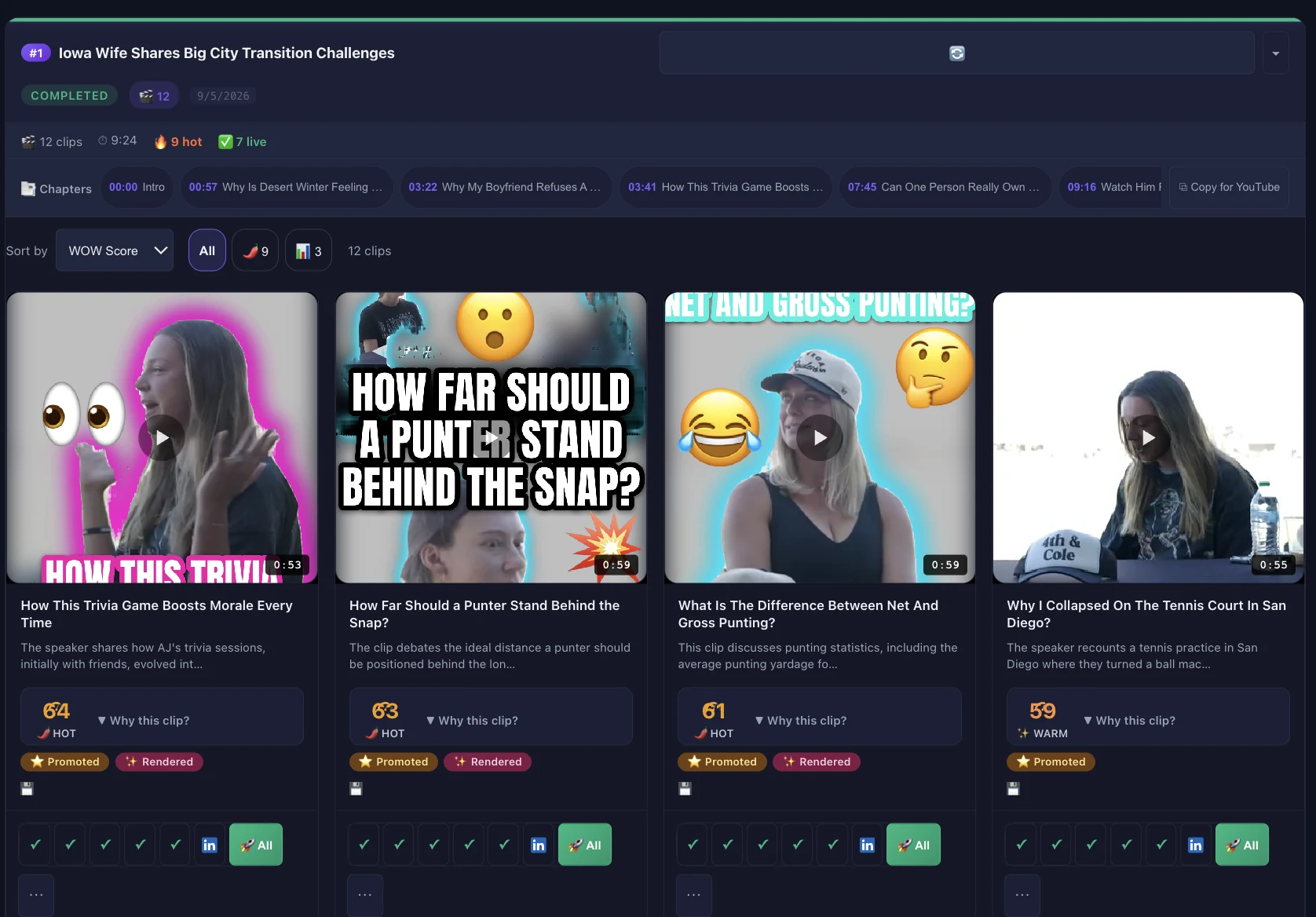
Clips are typically ready in minutes, not hours, depending on the length of the episode, and processing runs at the same speed on every plan.
Details that matter for podcasts
More than one person on camera
Interview and co-host shows are usually filmed wide. On paid plans, Studio's active-speaker reframing follows whoever is talking when you reframe to 9:16, 1:1 or 16:9, so the clip doesn't sit on the person who is only listening.
Filler words and dead air
Conversation has "um", "you know" and long pauses. In Studio you can remove filler words and silences in one pass, or delete any word or sentence from the clip's transcript and it is cut from the video. No timeline scrubbing.
Episode length and credits
The longest source you can upload depends on your plan: 30 minutes on Free, 60 minutes on Creator, 2 hours on Pro, 3 hours on Team, and no limit on Content Engine. Billing is 1 credit per minute of video you upload, however many clips come out of it, so a 45-minute episode costs 45 credits. Trimming a long intro or outro before you upload saves credits.
Several shows, several accounts
You can connect more than one account on each platform, including LinkedIn Company Pages, and post a clip to all of them from one upload. Publishing never uses credits.
Who this is for, and who it isn't
A good fit if you…
- Record your episodes on video, in a studio or remotely
- Publish full episodes and want a steady run of shorts without opening an editor
- Run more than one channel or account per platform
- Want clips posted on a schedule, not handed back as downloads
Probably not a fit if you…
- Only have an audio file. ChopHub works from video files and YouTube links
- Want a multi-track timeline with transitions. Studio has neither, though on Pro and above you can export to Premiere Pro, DaVinci Resolve or CapCut
- Already film short-form natively and have no long recordings to cut down
What it costs to start
The Free plan needs no card. It gives you 30 free credits to start (30 minutes of video, one-time — they don't refill), up to 2 videos a month, up to 5 clips per video, sources up to 30 minutes, and auto-posting to YouTube Shorts, TikTok and Instagram. Free clips carry a ChopHub watermark.
Creator ($15/mo, or $10/mo billed yearly) removes the watermark, handles episodes up to 60 minutes, adds AI titles and posts to all six platforms. Pro ($29/mo, or $19/mo billed yearly) adds unlimited videos and sources up to 2 hours. Every plan is on the pricing section of the homepage.
Questions people ask
Can ChopHub clip an audio-only podcast?
ChopHub works from video. It accepts MP4, MOV, AVI, MKV, WebM, M4V, FLV and WMV files, or a public YouTube link. Audio-only files are not on that list, so if your show is audio-only you would need a video version of the episode first.
How long can my podcast episode be?
It depends on your plan: up to 30 minutes on Free, 60 minutes on Creator, 2 hours on Pro, 3 hours on Team, and no limit on Content Engine. Billing is 1 credit per minute of video you upload, so a 45-minute episode uses 45 credits however many clips come out of it.
How many clips will I get from one episode?
Up to 5 clips per video on Free, 10 on Creator, 32 on Pro and Team, and 35 on Content Engine. You can also set a target number of clips and a clip length, and ChopHub picks the best moments to fill it.
Will the clips really post themselves?
Yes. Once you connect a platform and turn on scheduling, ChopHub uploads each clip at its scheduled time with no action from you. If you would rather approve each clip first, leave scheduling off and publish from the dashboard with one click.
Can I fix a caption or cut a sentence before a clip goes out?
Yes. After processing you can edit titles, descriptions, captions and hashtags for each clip. On paid plans, Studio also lets you cut the clip by deleting words from its transcript and remove filler words and silences.
Is my episode used to train AI?
No. ChopHub does not use your content for training. Processed clips are kept for 30 days, and original uploads are deleted automatically within 7 days.
Keep reading
Try it on your next episode
Free plan, no card. Upload one episode and see what comes back.
Clip My First Episode Free →