A webinar is an hour of material that gets watched once
Most webinar recordings are sent to the people who registered, posted on a page somewhere, and then forgotten. Inside them are answers to real customer questions, a speaker's clearest explanation of the product, and the points that landed best with the room. Short clips put those moments in front of people who never signed up for the session.
The trouble is the work: finding the moments, cutting them, adding captions so they play on mute, writing titles, then posting to every channel the team uses. ChopHub does that work and posts the clips for you. The homepage walks through the full product.
How it works for a webinar recording
- Bring in the recording. Download it from your webinar or meeting tool as a video file and upload it (MP4, MOV, AVI, MKV, WebM, M4V, FLV or WMV). If you publish replays on YouTube, paste the public link instead. ChopHub doesn't import directly from webinar platforms, so start from the file.
- ChopHub finds the moments. It transcribes the session and picks passages that stand on their own: a complete answer, a clear explanation, a strong opening line. Clips come back ranked, strongest first.
- Captions, shape and titles. Captions are burned in with word-level timing and are available in 30 languages, with automatic language detection. Clips are cropped to vertical with the speaker in frame, or you can choose 1:1 or 16:9 instead. AI titles are written for each clip on paid plans.
- Schedule or publish. Post to LinkedIn (a personal profile or a Company Page you manage), YouTube Shorts, TikTok, Instagram, Facebook and X. Let the scheduler spread clips across the week, or approve and publish each one yourself.
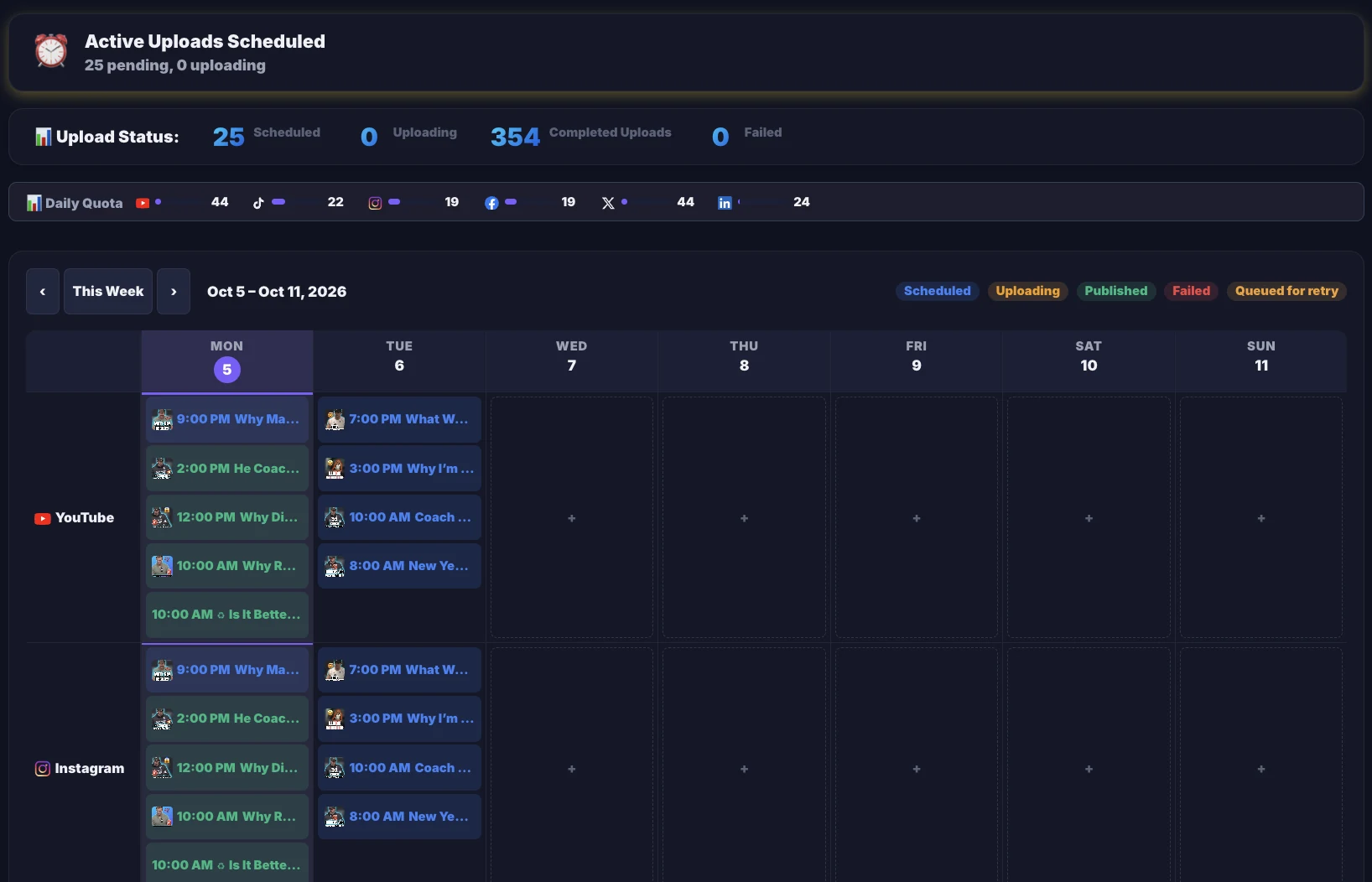
Clips are typically ready in minutes, not hours, depending on the length of the recording.
Getting good clips from a webinar
Speaker on camera, or slides on screen
When the speaker is on camera, a vertical crop with the speaker in frame works well. When the point being made is on a slide, a 1:1 or 16:9 clip keeps more of the screen visible. Every plan can output all three shapes.
Panels and multiple speakers
On paid plans, Studio's active-speaker reframing follows whoever is talking, so a panel recording can still become a clean vertical clip.
Your brand on every clip
On Pro and above, Studio's brand kit keeps your logos in a library, places them in any corner, adds a watermark or progress bar, and saves the combination as a preset you apply in one click.
Tightening the cut
Delete a word, sentence or tangent from a clip's transcript and it's cut from the video. Filler words and long silences can be removed in one pass. If you need a multi-track timeline or transitions, Pro and above can export an EDL, FCP 7 XML or CSV markers for Premiere Pro or DaVinci Resolve, or a CapCut bundle.
For marketing teams
The Team plan ($99/mo, or $79/mo billed yearly) includes 3 seats, 5 concurrent jobs, 1,800 credits a month and sources up to 3 hours. Content Engine ($249/mo, or $209/mo billed yearly) has 6 seats, 10 concurrent jobs, 5,000 credits a month and no source length limit.
- Connect more than one account per platform, including LinkedIn Company Pages, and publish to all of them from one upload. Publishing never uses credits.
- ChopHub checks platform connections every hour and emails you about two days before one expires, so scheduled posts aren't lost to a lapsed login.
- If a post does fail, you're emailed about that too. Results from every platform come back into one dashboard.
Who this is for, and who it isn't
A good fit if you…
- Run regular webinars, product demos or recorded talks
- Want those recordings working on LinkedIn and other channels after the live session
- Post to company and personal accounts and want one upload to cover both
Probably not a fit if you…
- Need motion graphics, transitions or a multi-track timeline inside the tool
- Need direct import from Zoom, Google Drive or a webinar platform
- Record sessions with little or no speech. ChopHub picks moments from the transcript, and captions need audio
Questions people ask
Can ChopHub import directly from Zoom or my webinar platform?
No. ChopHub takes file uploads (MP4, MOV, AVI, MKV, WebM, M4V, FLV and WMV) and public YouTube links. Download the recording from your webinar platform as a video file, then upload it.
Can clips be posted to our LinkedIn Company Page?
Yes. LinkedIn is one of the six platforms ChopHub posts to, and you can post to your personal profile or a Company Page you manage. LinkedIn is included on all paid plans; the Free plan posts to YouTube Shorts, TikTok and Instagram.
Our webinar is 90 minutes. Which plan do we need?
Pro accepts sources up to 2 hours, Team up to 3 hours, and Content Engine has no length limit. Free is capped at 30 minutes and Creator at 60. A 90-minute recording uses 90 credits, since billing is 1 credit per minute of video you upload.
Can more than one person on our team use the account?
Yes, on Team (3 seats) and Content Engine (6 seats). Free, Creator and Pro have 1 seat each.
Can we add our logo to every clip?
Yes, on Pro and above. Studio's brand kit keeps your logos in a library, places them in any corner, adds a watermark or progress bar, and saves the combination as a preset you apply in one click.
What if a platform connection expires while clips are scheduled?
ChopHub refreshes connections automatically and checks every hour for ones heading toward expiry. You get an email roughly two days before a connection lapses, with a link to reconnect. If a post does fail, you are emailed about that too.
Keep reading
Try it on your last webinar
Free plan, no card. Upload one recording and see what comes back.
Clip My First Webinar Free →